This transcript was generated from the episode audio and may contain minor errors.
[Music]
How can you make a manual process easier? Well, it starts by answering the question, how can I do this thing better? Welcome to Seto School School. My name is Chris Guillebeau. This is our classroom episode.
We're gonna talk today about using automation and workflows. Now, when I say, how can I do this thing better? For example, I've been using a tool recently called Keyboard Maestro. And this is not an endorsement or a sponsor message. I've just been using this tool myself.
I take a lot of screenshots. Sometimes I need to copy and paste the screenshot into a keynote presentation or other program. I used to have to take the screenshot, I would save it to Dropbox, then open the file manually before copying over the image to keynote or whatever. And finally, after I did this for like the 10,000th time, I realized, you know, this could be simpler or at least it should be simpler. So if it should be simpler, might there be a way for it to actually be simpler?
And so I use this tool, Keyboard Maestro, to create a single button to do what was taking me at least six clicks before. Now I get really excited about taking screenshots. I'm like, oh, is it time to take a screenshot? Yes, press this button, screenshot, bam. But hey, let's focus specifically on workflows for your side hustle.
In episode 1220, previous classroom episode, about three weeks ago or exactly three weeks ago, we talked about fulfilling orders and identifying the tasks you need to complete whenever someone places an order. So somebody goes to your website and say, place an order, they send you some money, much celebration is had. Hopefully you've got your phone rigged up to make a big cha-ching noise whenever that stranger puts money in your account. But in addition to the cha-ching, you've also got some stuff you need to do then. You have to send that customer a confirmation message.
You have to do whatever needs to be done to make sure they actually receive their order and probably some other tasks as well. The point is many of these tasks can probably be completed with the use of automation. Now it's nice to send an additional non-automated note to new customers. It's nice to actually send real communication. But in terms of notices and things, the first one and anything that you don't need to send that personal communication for, it can be sent automatically, usually through your shopping cart or payment processor.
Now, if you have heard me talk about email lists before, you know that they are usually the best means of being able to communicate with your customers. A lot of tools and tactics are optional. You don't have to be on every social network, et cetera. But for most businesses, an email list is not optional. It's definitely something you should have.
And technically, not to overwhelm you if you're new to this, but technically you don't just need one list. Over time, you'll probably have many. And your second email list might be your customer list 'cause you've got that general email list that you're building. That list is prospects. People who are interested in what you're talking about or interested in the information you're providing.
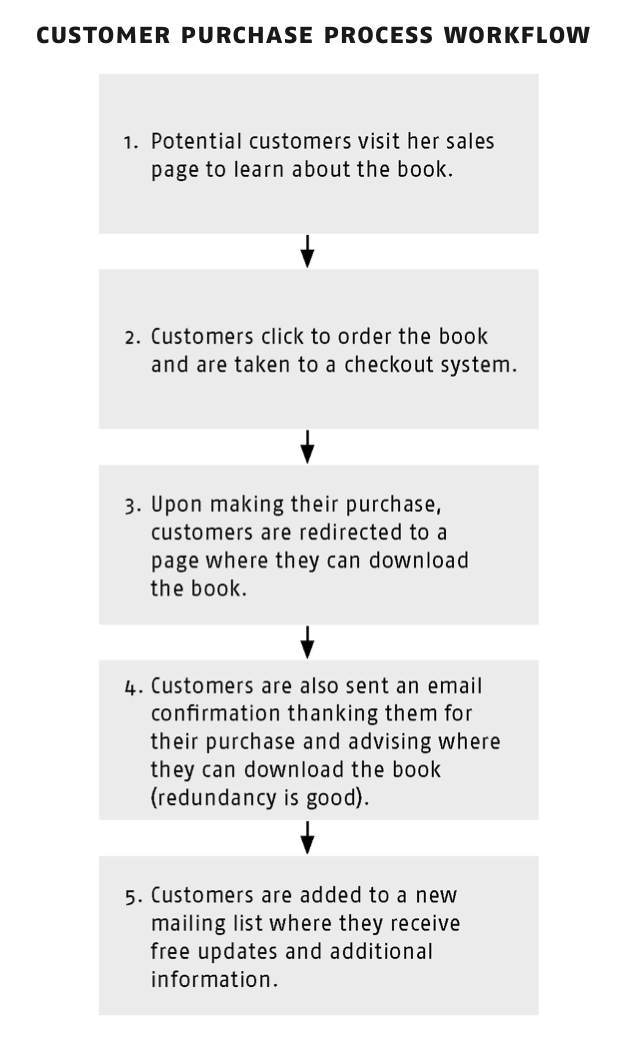
But you're also trying to gently sell them something, provide them a service, sell them a product, et cetera. So those people have expressed interest in what you're offering, but they haven't committed. Now, however, you have a second group. You have this group of people that have committed and you'll want to communicate differently with your customers. So automation, for example, can remove them from that prospects list and add them to the customer list.
You can still send them your regular mailings. It's not like you're gonna stop writing to them altogether, but you just don't want to try to sell them on something they've already purchased. Like this is a common mistake of new marketers. And just think about how awkward it can be. Think about it from the perspective of a consumer.
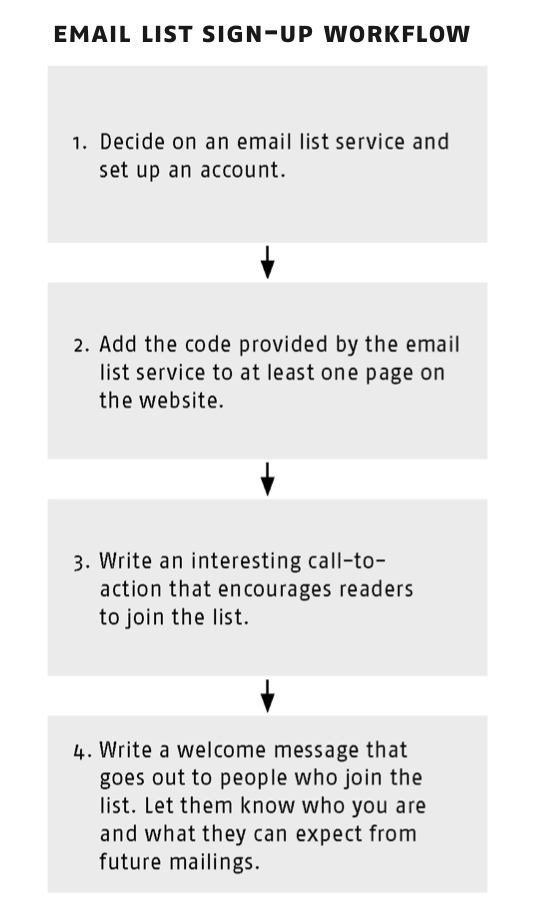
You end up buying something after you have been part of a sales process or you've joined some email list and it's compelling enough that you go and make a purchase. And then the next day you get an email saying, "Hey, go and purchase this thing." And you're like, "Well, wait a second, I already did." Then you get another email that says, "Here are all the people saying this thing is great." And you're like, "Well, I already have it." Then worse, you might get an email at some point that says, "Hey, this thing is on sale." And you're like, "But I already have it and I paid full price." All those situations can be avoided with that simple automation of removing them from a prospects list and adding them to a customer list. So I'm gonna give you a visual workflow of what a couple of different processes might look like. And I'm taking this from this side hustle book from idea to income in 27 days. So if you have that book, I'm pulling some of this from day 15, design your first workflow.
But if you don't have the book, not to worry, I'm taking the images from that section and adding them to the show notes page for this episode. So when you're able to access the notes page, you can get those images and see some real world examples of workflows and automations. All right, let's take a quick sponsor break. When we come back, I'm gonna tell you about a helpful tool that can make automation simple. It can actually do a lot of the work for you, save you a lot of time in the long run.
So shout out to our sponsor, thank you sponsor. I appreciate you helping us keep the lights on. And then I'll tell you more along with your assignment for the week. [Music]
All right, so one tool that helps a lot when you're doing automation planning out workflows, especially as you use more and more software, as your business becomes more complex. This tool is Zapier.
And as I was working on those notes, I realized I should give you a disclosure, unlike Keyboard Maestro, which I just kind of mentioned randomly at the beginning of the episode, Zapier has been a sponsor of Sidus Will School in the past. I've also been a customer of theirs for many years, long before the sponsor relationship. And so even though it's a paid product, they also have a free version where you can get 100 zaps a month without paying. And you're like, what's a zap? Well, I will tell you very shortly, in about 15 seconds actually.
And here's how it works. Zapier allows you to connect different online tools that don't usually talk to each other. I'm gonna give you an example. I used to use Gumroad, which is a tool that lets you take orders, really simple online interface, really great for digital products. I used to use Gumroad to handle online fulfillment for some of the online guides I sold.
And then I would use ConvertKit for my email manager. And those tools didn't talk to each other very well. So using Zapier, Zapier is basically a translator. I made a link, they call it a zap. So I made a zap to connect them, so that whenever somebody placed an order for any particular guide, it would automatically, or let's say automagically, it would automagically add them to the product list for that guide so that they would receive free updates.
And all this stuff happens completely invisibly to the customer. So the customer has no idea about this third party process that's connecting one service to the other. All the customer knows is they go online, they buy something, they are immediately added to a customer list, which is how it should be. But because I wanted to use Gumroad to take in orders and I wanted to use ConvertKit to send emails, and these are separate companies, the only other way to make it work would be a manual process. And it would also be a process that naturally involves a delay, unless I was sitting at my computer 24 hours a day, just refreshing and waiting for that order to come in.
Which I might do, but probably not every day for the rest of my life. That is just one example. If you find yourself using more and more tools and wishing that they could all be duct taped together somehow, Zapier is the duct tape. And you might not need it for a very, very simple process, but as it gets more complex, it's something that can make your life easier. And I'm sure there are other tools as well.
That's just the one that I am the most familiar with. Okay, each classroom feature will include an assignment. Your assignment this week, consider what you can do to simplify or otherwise make your order process more efficient. Experience the life changing magic of taking screenshots with one button. That was my trick.
Yours might be different, but whatever it is, try to find a way to be more efficient, use automation and workflows to your benefit. Even if you're just in a stage of idea generation or designing your business, think about what you could do to work smarter, not just harder. You can read notes for this in every classroom episode this year at sidehustleschool.com/classroom. This has been episode 1241. So those specific notes with the images of the workflows, et cetera, will be at sidehustleschool.com/1241.
One, two, four, one. Thank you so much. I hope you have a wonderful week. I hope you do something for yourself and I hope you keep listening. My name is Chris Guillebeau.
This is "Side Hustle School." [Music]
From the "Onward Project."
 Customer Purchase Process Workflow
 THIS WEEK’S ASSIGNMENT:
Consider what you can do to simplify or otherwise make your order process more efficient. Experience the lifechanging magic of taking screenshots with one button!
THIS WEEK’S ASSIGNMENT:
Consider what you can do to simplify or otherwise make your order process more efficient. Experience the lifechanging magic of taking screenshots with one button!